RateTube.ru
 Канал:
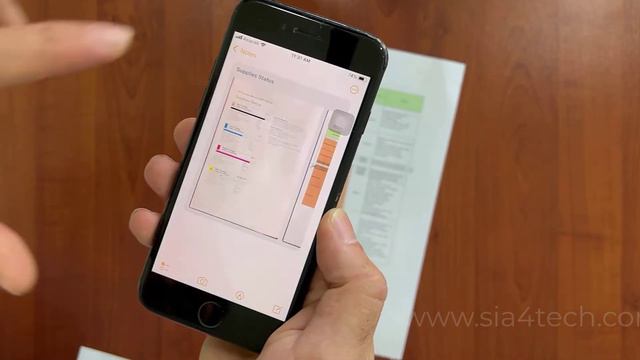
How to scan documents on your iPhone iPad or iPod touch
Scan a document
1-Open Notes and select a note or create a new one.
2-Tap the Camera button Tap Camera button to start scanning a document in Notes then tap Scan Documents Scan document icon.
3-Place your document in view of the camera.
4-If your device is in Auto mode your document will automatically scan.
If you need to manually capture a scan tap the Shutter button tap the Shutter button to scan or one of the Volume buttons.
Then drag the corners to adjust the scan to fit the page then tap Keep Scan.
5-Tap Save or add additional scans to the document.
for more videos visit:
sia4tech
siafortech
Music from: www.bensound.com
Royalty Free Music from Bensound
Источник: rutube.ru
⇒Расскажите об этом видео How To Scan documents using your iPhone for free, своим друзьям в социальных сетях.
Ссылка на страницу с видео:
HTML-ссылка на страницу с видео:
Код для вставки плеера:Mr. Refleed Gemeplay / Kick The Buddy... - онлайн
/Vocal Deep House/Dj Guztero - MIX 89... - онлайн
LEGAT BUSINESS FORUM – ИНТЕРВЬЮ С ОСНОВАТЕЛЕМ. ВАРИАНТЫ СОТРУДНИЧЕС...
Обзор БК Леон - бк леон отзывы игроков перейти-Дана Фомина - онлайн
SCORPIONS COVER DUO&JEANNE ASTER - TIME - онлайн






![[Tutorial] Как сделать двери на поршнях](https://pic.rtbcdn.ru/video/46/8b/468b82064bc367049ee3e9172442fce0.jpg)